# Hosted Payment Form
# Hosted Payment Form
The Integrated Commerce Omni-Channel Payment API offers a secure Hosted Payment Form (HPF) solution that simplifies payment collection while maintaining strong security and compliance standards.
## How It Works
1. Initiate Session: Your backend server makes a POST request to our API (e.g., /payment-methods/virtual, /transactions/virtual-sale, etc.) with your transaction details. You can include a returnUrl parameter to control where customers are redirected after completing payment, tokenizing a card, etc. The returnUrl is typically used to direct customers to order confirmation pages, receipt pages, or to grant immediate access to purchased digital content after successful payment. You can also include a useJavaScriptCallback flag to have the iframe post a message to the parent page with the transaction response.
2. Receive Session URL: Our API returns a short-lived, unique iframe URL specific to this transaction, along with a session ID and expiration timestamp.
3. Embed HPF: You embed this iframe URL in your payment page. The iframe contains a fully-styled, responsive payment form.
4. Customer Enters Payment Info: The customer enters their payment information (card details, billing address) directly into our secure form, which is isolated from your website's environment.
5. Payment Processing: When the customer submits the form, we process the payment in our secure environment.
6. Flow Completion: The flow completes differently depending on which parameters were included in your initial request. See the Flow Completion section below.
7. Webhook Notification: Regardless of the flow, your system receives a webhook notification with complete transaction details.
## Flow Completion
Depending on the parameters in your initial request, the behavior at the end of the transaction flow will be different:
useJavaScriptCallback set to true, and returnUrl provided: The iframe sends the transaction response using a JavaScript function to your parent page, and you can direct the rest of the customer experience based on the transaction outcome. The customer is redirected to the returnUrl provided, with transaction result parameters in the URL query string.useJavaScriptCallback set to true, and no returnUrl provided: The iframe sends the transaction response using a JavaScript function to your parent page, and you can direct the rest of the customer experience based on the transaction outcome. The customer is redirected to the default success or issue screen.useJavaScriptCallback omitted from the request or set to false, and returnUrl provided: No JavaScript function is called on the parent page. The customer is redirected to the returnUrl provided, with transaction result parameters in the URL query string.useJavaScriptCallback omitted from the request or set to false, and no returnUrl provided: No JavaScript function is called on the parent page. The customer is redirected to the default success or issue screen.
## Payment Form and Response Screens
Our Hosted Payment Form provides a clean, professional payment interface that collects:
- Cardholder name
- Card number, expiration date, and security code
- Billing address details
The form is responsive and works on mobile, tablet, and desktop devices.
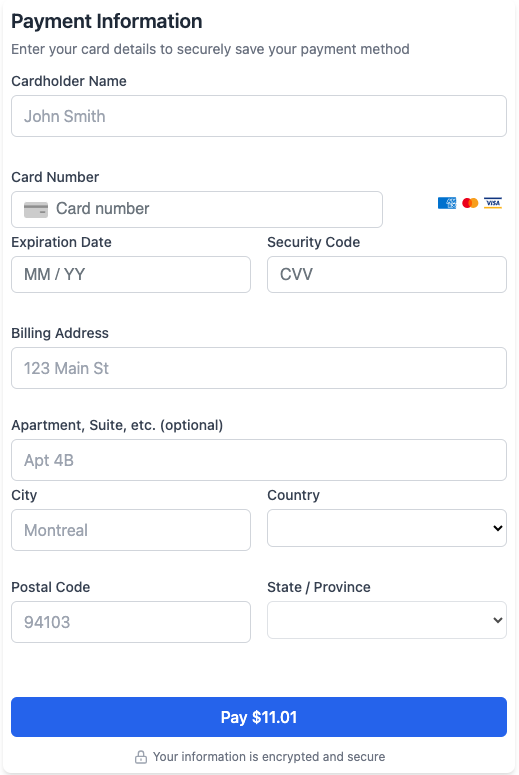 Example of the hosted payment form
When no returnUrl is provided and the useJavaScriptCallback flag is not used, customers will see success or issue screens that provide immediate visual feedback about their transaction status.
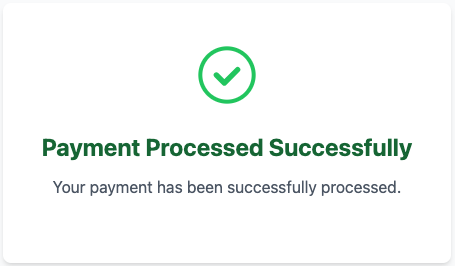 Success screen shown after completed payment
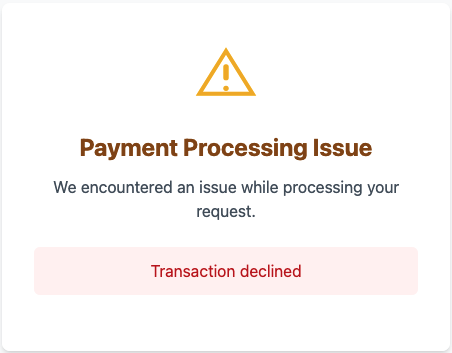 Issue screen shown when payment problems occur
If a payment session expires or becomes invalid, customers will see the following screen:
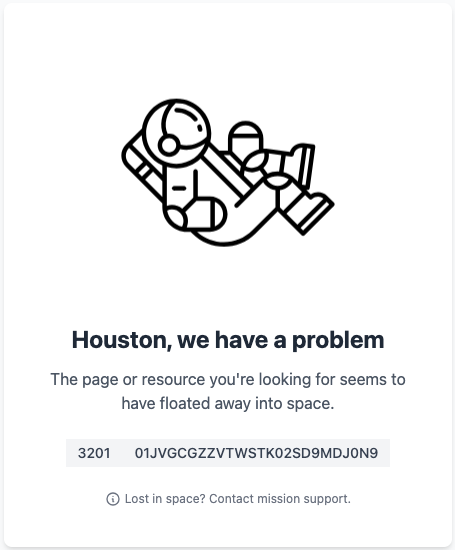 Session expiration screen shown when payment session times out
## Transaction Result Parameters
When using the returnUrl parameter, the following information is appended to your URL when the customer is redirected back to your site:
| Parameter |
Description |
| paymentMethodId |
If successful, the ID of the tokenized card that was used or created during this transaction. Example: pmt_tkn_01JV...2HA |
| resultCode |
Transaction result status code: 0 (successful) or 9999 (issue). Example: 0 |
| cardType |
If successful, the type of card used for this transaction. Example: VISA |
| transactionId |
Unique identifier for the transaction. Example: trx_01JV...6R |
| referenceId |
A reference ID to tag and track this transaction for reconciliation. The reference ID is also used for processing referenced refunds. Example: ref_7ec1...75f |
| amount |
For a successful sale or auth, the approved amount. The amount is always a positive integer in the smallest denomination of the currency (e.g., cents for USD or CAD). Example: 1101 |
| invoiceNumber |
An alphanumeric invoice number for this transaction if one was provided in the request. Example: inv_1062...d2f |
| orderNumber |
An alphanumeric order number for this transaction if one was provided in the request. Example: ord_ed1a...f8 |
| hash |
A lowercase hex-encoded HMAC-SHA256 hash that validates the authenticity of the redirect and protects against tampering of the query string parameters. It is calculated using the concatenated referenceId and resultCode values as input and the paymentMethodId (pmt_vrt_...) as the secret key. This cryptographic validation ensures that redirect responses haven't been modified. Example: 7795ad4335...0d7ecdbce |
| errorMessage |
If an issue occurred, text explaining what the issue was. Example: "Transaction declined" |
| errorCode |
If an issue occurred, a specific error code for the issue. Example: 1234 |
These parameters allow your application to respond appropriately to transaction outcomes, update your order systems, and provide relevant feedback to customers without requiring a separate API call to check transaction status.
## Secure Payment Redirect Verification
When using the
returnUrl approach, our system includes a cryptographic hash to validate the authenticity of the redirect. This protects against tampering of the query string parameters.
The verification process uses HMAC-SHA256 hashing. When we redirect customers to your return URL, we include key transaction parameters, along with the lowercase hex-encoded hash included as a
hash query parameter in the redirect URL.
- Hash input: The
referenceId and resultCode values, concatenated with no spaces (referenceId + resultCode).
- Secret key: The paymentMethodId (e.g.,
pmt_vrt_...) used to create the hosted payment form session.
- Output format: Lowercase hex-encoded HMAC-SHA256 hash.
While similar to our webhook authentication method, the redirect hashing process has important differences:
| Feature |
Redirect Hash |
Webhook Hash |
| Input |
referenceId + resultCode |
Raw request body |
| Secret |
paymentMethodId |
Shared secret (provided out-of-band) |
| Hash location |
Query string parameter (hash) |
Header (x-fsk-wh-chksm) |
To validate the authenticity of a redirect, follow these steps:
- Extract the
hash parameter from the returned URL parameters
- Extract the
referenceId and resultCode parameter values from the URL
- Concatenate the two values with no spaces:
referenceId + resultCode
- Use the original
paymentMethodId used when generating the hosted payment form session (the pmt_vrt_... value) as the HMAC secret key
- Generate the HMAC-SHA256 hash and encode the result as a lowercase hex string
- Compare your generated hash with the received
hash parameter using an exact match comparison
- Only accept the redirect if the hashes match exactly
Example
When a payment method with ID pmt_vrt_01JTNZ2Z2XBNMGMG9ENY41AKRG was used to create a hosted payment page session, and given the following returnUrl:
https://merchant.example.com/payment-complete?paymentMethodId=pmt_tkn_01JVGD11ZW2N8859Z9RSJKBPDB&resultCode=0&cardType=VISA&transactionId=trx_01JVGD0BD3D6SRW6A941CPWCJ5&referenceId=ref_238832ae&amount=1899&invoiceNumber=inv_7d7ab39d&orderNumber=ord_cead58aa&hash=7795ad43353004b2d8434af7ff5253d597ca290492eec43c714460a0d7ecdbce
Extract the referenceId and resultCode query string key/value pairs:
referenceId=ref_238832ae
resultCode=0
Concatenate the values only into a single string:
ref_238832ae0
Use the payment method ID used to create the hosted payment form session as the HMAC secret key:
pmt_vrt_01JTNZ2Z2XBNMGMG9ENY41AKRG
Generate the HMAC-SHA256 hash, and encode the result as a lowercase hex string:
7795ad43353004b2d8434af7ff5253d597ca290492eec43c714460a0d7ecdbce
The hash value from the query string must match 7795ad43353004b2d8434af7ff5253d597ca290492eec43c714460a0d7ecdbce.
Implementing this check on your server helps prevent tampering and spoofed redirect responses, and should be a standard part of your payment flow integration.
When using useJavaScriptCallback, the standard transaction response object is passed to the parent window when the transaction is complete. In addition to the response fields (refer to the various originalResponse objects of the related webhooks), a success flag is also present in the response to indicate whether the transaction was successful.
Example Successful Sale Response
```
{
"success": true,
"id": "trx_01J2F0EKHC7HY2R93C8ENBD1FG",
"timestamp": "2025-06-02T23:56:18.2102020Z",
"type": "Sale",
"status":"Completed",
"accountHolder": {
"id": "aho_01JRZPRGFF4J2SZC3HMDBYEN2J",
"externalId": "usr_1234567890123",
"contact": {
"name": "John Doe",
"countryCode": "US",
"zipCode": "60606",
"address": "300 S Wacker Dr",
"state": "IL",
"city": "Chicago"
}
"referenceId": "ref_s192i49i",
"orderNumber": "order_number_1234",
"invoiceNumber": "inv_12345678",
"requestedAmount": 1000,
"approvedAmount": 1000,
"balanceAmount": 0,
"paymentMethod": {
"id": "pmt_vrt_01JRZPTWS99Z7RB57Q1CVWSWDS",
"type": "Virtual",
"currency": "USD",
"description": "Online Checkout Iframe"
},
"transactionResponses": [
{
"responseCode": 1,
"amountApproved": 1000,
"paymentMethod": {
"id": "pmt_tkn_01JRZPRGFF4J2SZC3HMDBYEN2J",
"type": "Token",
"currency": "USD",
"billingContact": {
"name": "John Doe",
"countryCode": "US",
"zipCode": "12345",
"address": "123 Main St",
"state": "NY",
"city": "Anytown"
},
"cardType": "VISA",
"maskedCardNumber": "4****1111",
"cardExpDate": "1225"
},
"cardType": "VISA",
"avsResult": "Y",
"cvvResult": "M",
"accountType": "Credit"
}
],
"resultCode": 0,
"resultText": "APPROVED"
}
```
Example Failed Transaction Response
```
{
"success": false,
"id": "trx_01J2F0EKHC7HY2R93C8ENBD1FG",
"referenceId": "ref_s192i49i",
"orderNumber": "order_number_1234",
"invoiceNumber": "inv_12345678",
"type": "Sale",
"resultCode": 9999,
"resultText": "Transaction declined",
"errorMessage": "Transaction declined",
"errorCode": "-1"
}
```
Example Session Error Response
```
{
"success": false,
"type": "Tokenize",
"resultCode": 9999,
"resultText": "Failed to retrieve session data",
"errorMessage": "Failed to retrieve session data",
"errorCode": "3201"
}
```
The exact fields returned will depend on the transaction type and whether the transaction was successful or encountered an error. The message is a JSON object that provides complete transaction details, allowing your application to handle the response appropriately without requiring additional API calls.
## Error Handling
Your implementation should handle various response statuses, including:
- Successful payments (resultCode = 0)
- Declined transactions
- Expired sessions
- Processing errors
When processing errors occur or transaction status is uncertain, use the
GET /transactions (List Transactions) endpoint to verify the final transaction outcome before retrying or taking corrective action.
Implement Proper Origin Validation
Always validate that postMessage events come from our trusted domain to prevent malicious scripts from sending fake transaction results.
Handle Timeouts Gracefully
Sessions expire after a short period, so provide clear messaging to users if this happens.
Test with Our Test Cards
Use our test cards during your integration development.
Responsive Design
Ensure your payment page layout accommodates the iframe appropriately on all devices.