When billingInfoCaptureLevel is set to Full (or when no formConfig is provided), the form displays complete billing address fields:
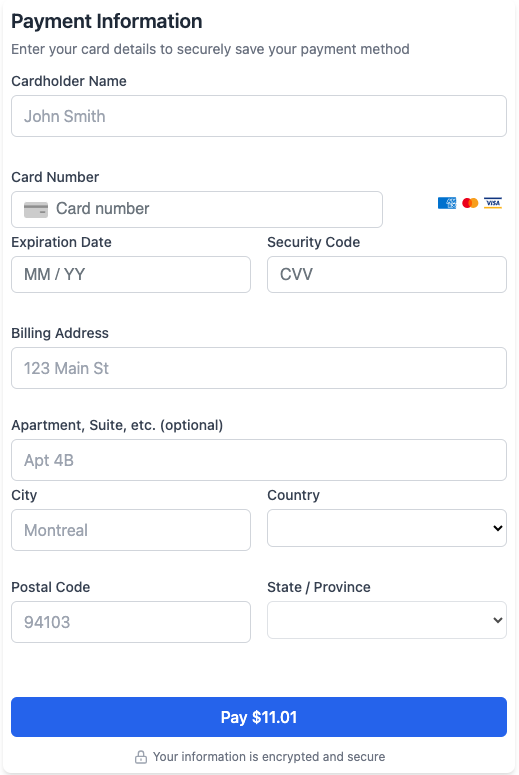 Full billing mode collects complete address information
billingInfoCaptureLevel property controls how much billing information is collected from the customer. There are two options:
formConfig is specified.When billingInfoCaptureLevel is set to Full (or when no formConfig is provided), the form displays complete billing address fields:
Full billing mode collects complete address information
When billingInfoCaptureLevel is set to Minimal, the form displays a compact layout with only the ZIP/postal code field shown inline with the card fields:
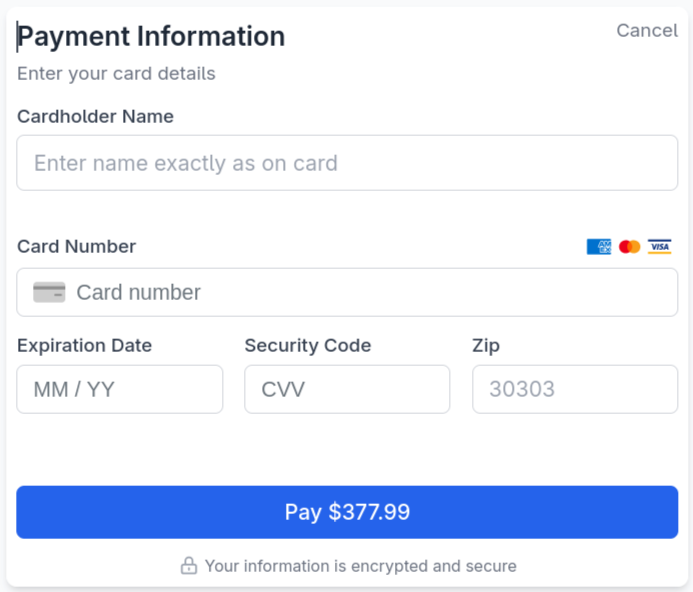 Compact form mode with minimal billing (ZIP code only)
This compact form is ideal for scenarios where:
Include the formConfig object in your request to customize the form:
Minimal billing capture level is not supported for ACH transactions. If you attempt to use billingInfoCaptureLevel: Minimal with an ACH payment method, the request will be rejected with a validation error.
| Property | Type | Default | Description |
|---|---|---|---|
billingInfoCaptureLevel |
string | Full |
Controls billing information collection. Values: Full, Minimal |