> For the complete documentation index, see [llms.txt](https://docs.omni.integratedcommerce.io/llms.txt). Markdown versions of documentation pages are available by appending `.md` to page URLs; this page is available as [Markdown](https://docs.omni.integratedcommerce.io/payments/ach.md).
# ACH bank transfers
US bank transfers, their asynchronous lifecycle, and the three things they cannot do.
The API supports ACH (Automated Clearing House) bank transfer transactions for US-based payments. ACH transactions are processed asynchronously and may take 1-5 business days to complete.
## Supported transaction types
* **Sale** - Initiate a bank transfer from the customer's bank account
* **Refund** - Process reversal of a previous ACH sale transaction
* **Token Sale** - Process a sale using a previously tokenized ACH payment method
## Personal and business accounts
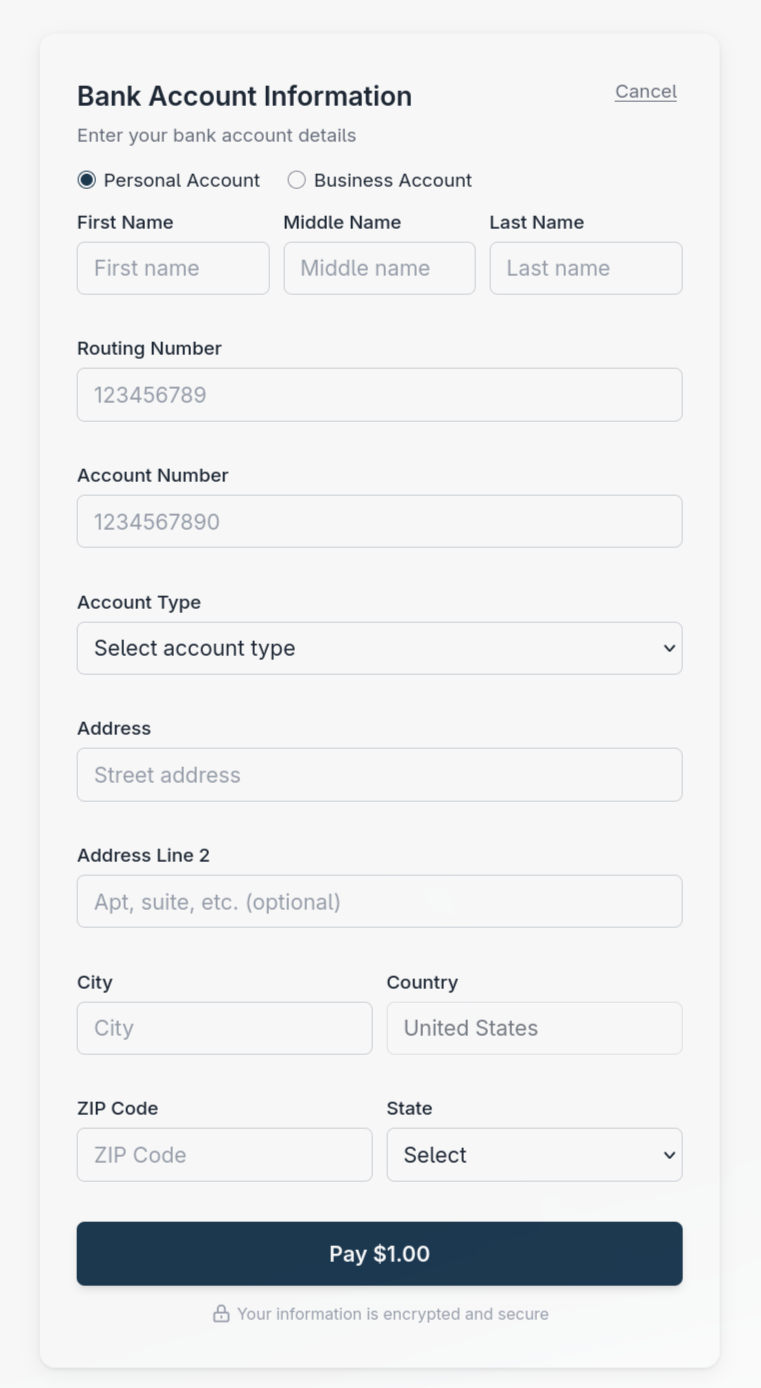
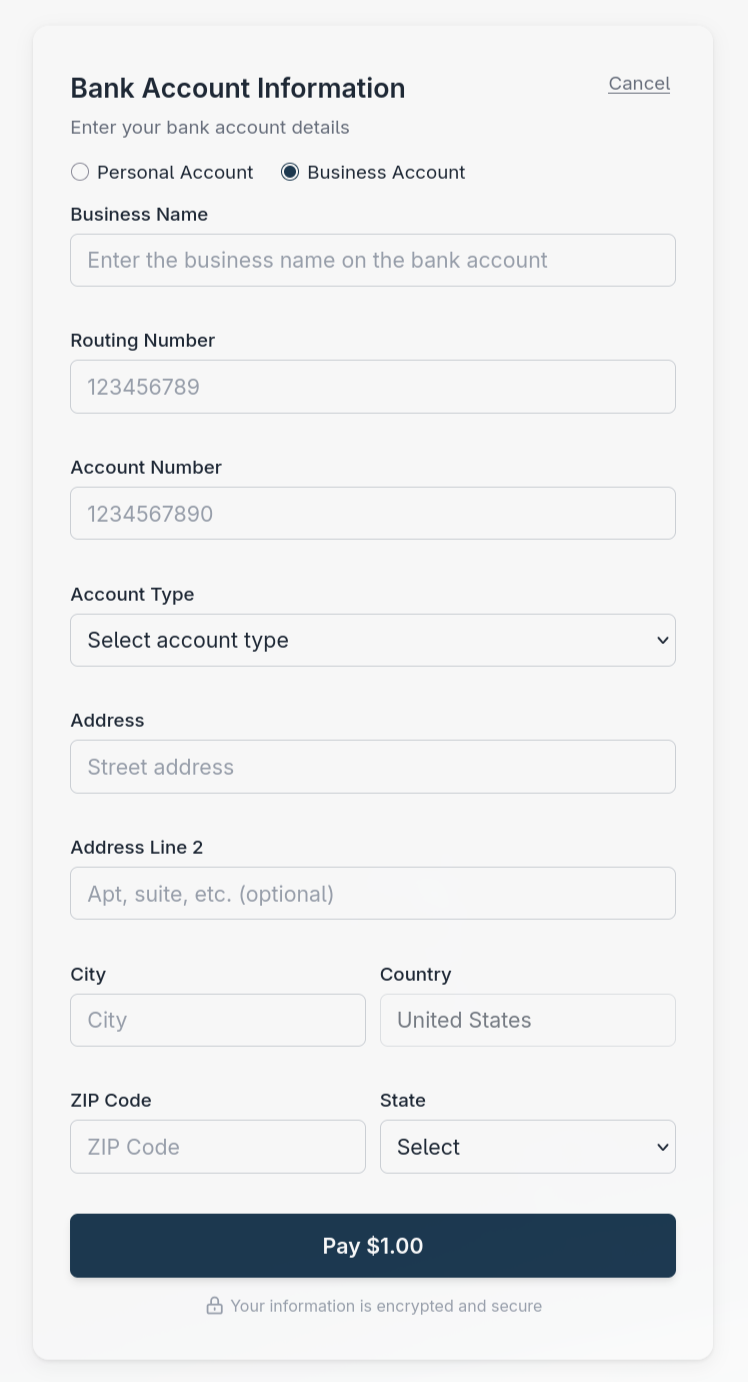
For ACH sale and tokenization sessions, the [Payment SDK](/payment-sdk/payment-sdk.md) and [Hosted Payment Form](/hosted-payment-form/hosted-payment-form.md) display a Personal Account / Business Account toggle above the name fields. Personal Account is selected by default. The customer selects the option that matches the bank account holder.
| Selection | Name fields |
| ---------------- | --------------------------------------------------------------------------------------------------------------------------------------- |
| Personal Account | First Name is required (1 to 30 characters). Middle Name is optional (up to 40 characters). Last Name is required (1 to 40 characters). |
| Business Account | Business Name replaces the personal name fields and is required (2 to 70 characters). Enter the business name on the bank account. |
Name lengths exclude leading and trailing spaces. Switching between the options preserves the entered names. The form uses the name for the selected option as the billing name.
The customer also selects Checking or Savings in the Account Type field. This describes the bank account type; Personal Account / Business Account describes who holds it. Both choices require the routing number, account number, and full US billing address, including a 5-digit ZIP code.
The toggle appears automatically for ACH sessions. There is no `formConfig` property or SDK `mount()` option to preset the selection.
{% tabs %}
{% tab title="Personal Account" %}
Personal Account is selected by default.
{% endtab %}
{% tab title="Business Account" %}
Business Account replaces the personal name fields with Business Name.
{% endtab %}
{% endtabs %}
## Restrictions
{% hint style="warning" %}
* **Void** - ACH transactions cannot be voided. Use refund instead.
* **Authorization** - ACH does not support authorization-only transactions. All ACH transactions are sales.
* **Capture** - Not applicable for ACH transactions (no separate auth/capture flow).
{% endhint %}
Attempting to use an ACH token for an auth, void, or subscription transaction is rejected with error code `2010` (`InvalidPaymentMethodType`).
ACH payment methods also always require full billing information: `billingInfoCaptureLevel: Minimal` is **not supported** and is rejected with a validation error. See [Form configuration](/hosted-payment-form/form-configuration.md#ach-payment-method-restrictions).
3D Secure is a card-network protocol and does not apply to ACH. Setting `enable3DSecure: true` on an ACH payment method is rejected with a validation error.
## The asynchronous lifecycle
An ACH sale does not resolve inside the API call. This is the single biggest difference from a card transaction, and your integration has to account for it.
```mermaid
stateDiagram-v2
[*] --> Created: hosted session created
Created --> Pending: customer opens form
Pending --> Submitted: customer submits
Submitted --> Acknowledged: initial gateway response
Acknowledged --> Processing: response processed
Processing --> AwaitingSettlement: bank transfer pending
AwaitingSettlement --> Completed: final bank outcome
Completed --> [*]
```
The session-creation response is a session object with `status: Pending`; it is not a debit result. After submission, the hosted ACH response uses `status: Processing` with `resultCode: 0`. Other asynchronous bank-transfer flows can return `resultCode: 4001`. The immediate response may report `status: Completed` even while settlement is pending. Neither that status nor the SDK's `success: true` proves that funds settled.
While a transfer is in `Processing` or `AwaitingSettlement`, transaction retrieval can return no result. An empty result is not permission to retry.
Configured [webhooks](/webhooks/webhooks.md) carry the final transaction outcome. `status: Completed` means processing finished for both approval and decline. Read `transactionResponses[].responseCode`: `1` is approved and `10` is declined, with other codes identifying specific outcomes. There is no `Declined` transaction status.
Use [transaction retrieval](/payments/transaction-retrieval.md) to reconcile a missed response or webhook. Bank processing time depends on the bank and the payment schedule; allow for several business days.
## Do not retry an accepted transfer
An accepted transfer is still pending bank settlement. Retrying creates a second debit. Hold the order in a pending state and wait for the webhook.